Threema. The Secure Messenger
Threema AGCommunication
3.8728.00 Reviews
- Version
- 6.5.1
- Installs
- 5.00M
- Age Rating
- Everyone
Screenshots

Our Review of Threema. The Secure Messenger
 Analysis by Appyee
When several people share a home, a messaging app can become part of the household routine: one person needs to coordinate a pickup, someone else wants to keep a private conversation separate, and a shared tablet may sit within easy reach of everyone. I find Threema most interesting in that setting not as a family-control tool, but as a messenger built around personal account boundaries. Its privacy-first approach can suit adults who want a separate place for everyday coordination, while its paid price and need for contacts to join make it a more deliberate choice than a default group chat.
A household chat works only when everyone is on board
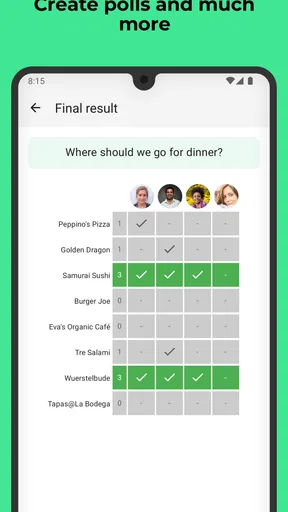
Picture a practical weekday: one adult is arranging a grocery pickup, another is running late, and a family member needs the updated plan. A group chat can keep those details in one place, and Threema’s polls can help settle a choice such as which evening works for dinner without turning the conversation into a long string of replies. That is a concrete advantage over a basic text thread when a group needs to make a decision, though it depends on the people involved already using the app.
The key trade-off is adoption. A household cannot coordinate in Threema with a relative who refuses to install another messenger, so I would not move every family conversation there overnight. I’d first agree on which group will use it and keep an existing channel available for people who are not ready to switch. That small step avoids making a privacy preference into a communication bottleneck.
Separate accounts matter more than a shared screen
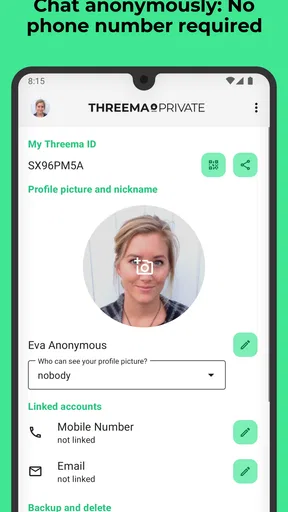
Threema’s ID-based setup is useful when someone wants an account that does not need to be tied to a phone number or email address. In a household, though, that is a reason to keep each person’s account and conversations personal, not to treat one installed app as a shared family inbox. If a device is passed around, messages may be visible to whoever can open it; the app’s privacy focus should not be mistaken for a substitute for sensible device boundaries.
My practical approach would be to use individual devices and avoid leaving a personal messenger open on a communal tablet. If a shared device is unavoidable, household members should decide who can access it and when, rather than assuming that an account ID automatically separates users on the same screen. This distinction is easy to overlook: identity privacy and physical access are different problems.
Age context and trust need a human decision
The app has an Everyone content rating, but a broad age label does not decide whether it is appropriate for a particular child or household. I would consider the child’s maturity, the people they communicate with, and the family’s expectations before choosing any messenger. Threema’s emphasis on private communication may appeal to adults who want fewer personal identifiers attached to an account, but privacy settings do not replace conversations about safe contact, sharing, or what to do when a message feels uncomfortable.
Nor would I choose it because I expected built-in parental supervision or household administration. The useful question is whether a young person is ready to manage private conversations responsibly and whether adults can agree on clear boundaries. For a family seeking a supervised environment or a tool designed around parent-managed accounts, a different option may be a better fit.
Getting Started with Threema
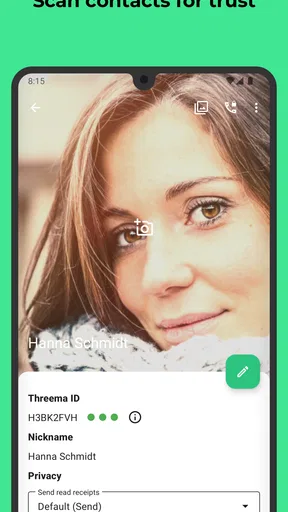
First things first, setting up Threema is a breeze. Unlike other messaging apps that demand your phone number like a needy ex, Threema lets you stay anonymous. You create a Threema ID, and voilà, you're in. This ID is your gateway to a world of secure messaging without the pesky need to link it to your phone number or email. Talk about a breath of fresh air!
Interface and Usability
The app's interface is sleek and intuitive. Even if you’re someone who struggles with tech (no judgment here), you’ll find it easy to navigate. The design is clean, with no unnecessary clutter to distract you from your chats. Everything is where you’d expect it to be, making the user experience smooth and frustration-free.
That simplicity is helpful when you are trying to get a less tech-confident relative into a new group, but it cannot remove the learning curve of a new account and contact list. I would set it up alongside that person rather than merely telling them to install it, then send a low-stakes test message and agree on which conversations belong there. If the household already has a familiar group chat that everyone checks, the change may feel like extra work until enough people make the switch.
Security Features
Now, let’s get into the meat of why you’re considering Threema: security. This isn’t your average messaging app. It uses end-to-end encryption for all messages, meaning nobody—not even Threema—can read your messages. All your chats, voice calls, and even group conversations are locked up tighter than Fort Knox.
What’s more, Threema doesn’t store any metadata. So, who you’re chatting with, when, and how often remains a mystery to everyone but you. Plus, messages are deleted from the servers once delivered, leaving no digital footprint behind.
For everyday use, I see the privacy benefit as a reason to choose carefully what goes into a conversation, not as a promise that every part of digital life becomes invisible. A recipient can still read a message, and a person with access to an unlocked device may be able to see its contents. I would still use a device lock, keep personal accounts to their owners, and think before sharing sensitive material in any chat. Strong communication privacy is valuable, but it does not erase the ordinary risks of screenshots, misdirected messages, or someone else using your phone.
Features Beyond Messaging
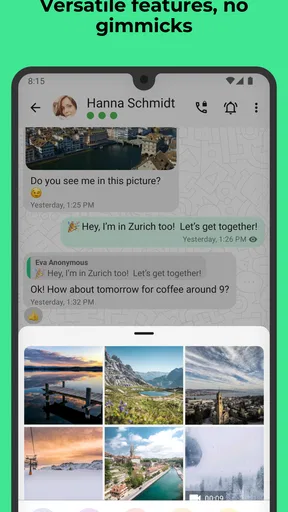
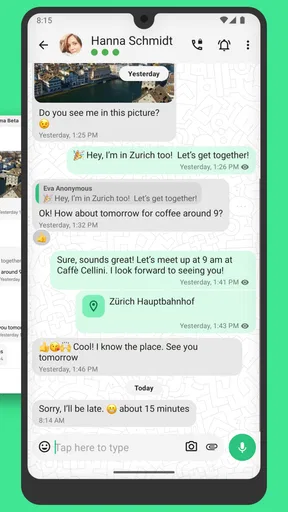
Threema isn’t just a one-trick pony. Apart from secure messaging, it offers voice calls, video calls, and the ability to share files, locations, and more. The app also supports polls within group chats, which is a handy feature for organizing events or making group decisions without endless back-and-forth.
That range makes it plausible as a primary messenger for a small group rather than a single-purpose place for secret notes. For example, a household group could use a poll to pick a time for a shared errand, then use a message to confirm who is handling it. Location sharing can also help with a real-world meet-up, but I would treat it as something to use intentionally: share it when there is a clear coordination need, and avoid making location disclosure the default for everyone.
Files are another reason to keep a group organized, especially when people need to pass along a document or image rather than burying it in a separate email thread. Still, anyone choosing a messenger for work or family logistics should check that the people who need those files can actually receive and open them. Threema’s tools are useful only when the whole workflow fits the group; they do not guarantee that every recipient will prefer it to email, a shared folder, or the messenger they already use.
Customization and Extras
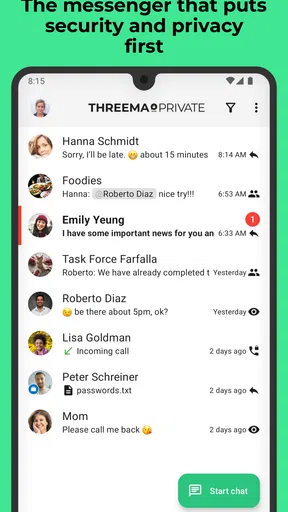
One of the fun aspects of Threema is the level of customization it offers. You can tweak the app’s appearance to suit your style by choosing different themes and colors. And if you’re a stickler for organization, you’ll appreciate the ability to categorize chats using colors and labels.
For someone juggling household coordination alongside other conversations, labels and colors can help make the chat list easier to scan. I would use a small, consistent system—perhaps one visual category for household logistics and another for personal conversations—rather than trying to label everything. Organization is most useful when it reduces the chance of posting a practical detail in the wrong chat, not when it becomes another system to maintain.
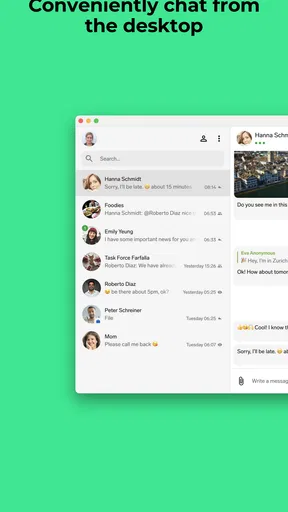
Threema also offers a web client, so you can continue your conversations seamlessly from your computer. It’s perfect for those times when typing on a tiny screen just won’t cut it.
A computer can be more comfortable for writing a longer message or reviewing a conversation while handling another task. In a shared home, however, convenience has to be balanced against who else can see the screen. I would use the web client in a private setting and sign out or close access when stepping away from a household computer. A larger screen makes typing easier, but it also makes an unattended conversation easier to notice.
What the price and audience mean in practice
Threema is a paid communication app from Threema GmbH. It costs $7.49, so I would think of it as a deliberate purchase rather than a free messenger to install casually. The payment may be worthwhile for someone who values an account that does not require a phone number or email address and expects to use the privacy-focused tools regularly. It is less compelling for a person whose friends and family are already settled in another app and who would rarely open a second one.
The app has an average rating of 3.9 from around 75,000 ratings, alongside about 717 written reviews, and has passed 5 million installs. Those figures suggest it has found a substantial audience, but they do not settle the personal question of whether your household will adopt it. The deciding factor is more likely to be your contacts’ willingness to use it than the size of its user base.
Its release dates back to May 27, 2013, and version 6.4.2 is the current version. It requires Android 7.0 or later, and its content rating is Everyone. For a practical compatibility check, I would confirm that the devices each person plans to use meet the operating-system requirement before paying and organizing a move. A messenger is only a dependable coordination channel when the people who need it can run it.
Where it differs from familiar messengers
Compared with the usual free, phone-number-centered messaging apps, Threema asks for a more conscious decision: pay for it, create an ID, and invite the people you want to reach. That can be appealing if separating an account from a phone number is important to you. The trade-off is that familiar alternatives often have a head start in your contacts, so they can be easier for spontaneous chats with relatives, neighbors, or occasional group members.
I would not frame this as one messenger being right for every conversation. Threema makes more sense when a group values private communication enough to establish a shared routine. A free alternative may be more practical when reach and convenience come first, especially for a large, mixed group that is unlikely to install another app. You can keep both approaches in mind: use Threema for the conversations where its account and privacy choices matter, and avoid forcing it on people who need a simpler way to reach you.
One useful way to test that fit is to start with a small, stable group rather than moving every contact at once. Try a household coordination chat or a close circle that already agrees on the need for a private channel. If members keep missing messages because they rarely open the app, that is meaningful feedback: the strongest privacy preference in the room cannot make a neglected channel useful. If the group checks it naturally, you have a more realistic basis for deciding whether to bring other conversations over.
Is Threema Worth It?
So, the million-dollar question: is Threema worth your time and money? If privacy is a top priority for you, then absolutely. It’s an app that delivers on its promise of secure communication without compromising on functionality or ease of use.
My answer depends on the people you need to reach. For a privacy-minded adult, a small household, or a group that wants calls, file sharing, and polls in one messenger, it is a credible choice. For someone who needs universal reach, does not want to pay, or is looking for parent-managed accounts, the friction may outweigh the benefits. I would also skip it as a shared family inbox: separate personal accounts and clear access to devices are more sensible than passing one messenger login around.
While it does come with a small price tag, the peace of mind it provides is worth every penny. In a world where data breaches and privacy invasions are all too common, Threema is like your digital bodyguard, always on the lookout to keep your information safe.
That peace of mind is strongest when the app’s privacy model matches the way you actually communicate. It cannot make reluctant contacts participate, prevent someone from reading a message on an accessible device, or replace good judgment about what to share. I see the purchase as worthwhile when I expect to use it with people who share the same priorities, rather than as a guarantee that every conversation becomes risk-free.
In conclusion, if you're in the market for a robust, secure, and reliable messaging app, Threema should be on your radar. It’s a solid choice for anyone looking to keep their conversations private and their data secure.
For a household, I would start with a clear purpose: decide which conversations belong in the app, keep each person’s account personal, and check that the people involved are comfortable using it. That makes it easier to judge whether the privacy benefits and coordination features justify a separate paid messenger. If your group mainly needs the broadest possible reach, stick with the option your contacts already use; if privacy and account separation matter enough to build a routine around them, Threema is worth considering.
Ready to give it a go? You can download Threema from the Google Play Store or the Apple App Store. Trust me, you won’t regret it.
Verdict
Strengths of Threema. The Secure Messenger
- End-to-end encryption ensures privacy.
- No phone number required for registration.
- Supports voice and video calls.
- Open-source for transparency.
- Cross-platform compatibility.
Limitations of Threema. The Secure Messenger
- Limited user base compared to competitors.
- Occasional syncing issues.
- Paid app may deter some users.
- No cloud backup for messages.
- Interface can feel cluttered at times.
Similar Picks in This Category
View All
Google Messages
Google LLC4.6

Gmail
Google LLC4.1

Google Meet
Google LLC4.4

Google Chrome
Google LLC4.1

WhatsApp Messenger
WhatsApp LLC4.6

Carrier Services
Google LLC4.2
Frequently Asked Questions
What makes Threema different from other messaging apps?
Threema stands out due to its strong focus on privacy and security. Unlike many other messaging apps, Threema doesn’t require a phone number or email to set up. It uses end-to-end encryption to ensure that messages, calls, and shared media remain completely private. Additionally, Threema is based in Switzerland, known for its strict data protection laws.
Is Threema truly anonymous?
Yes, Threema is designed to provide a high level of anonymity. Users are identified by a randomly generated Threema ID instead of a phone number or email address. This feature allows you to use the app without revealing personal information, ensuring that your identity remains private from both the app's developers and fellow users.
How does Threema handle data privacy?
Threema prioritizes data privacy by not logging conversations or storing metadata. The app's servers are located in Switzerland, which has robust privacy laws. Furthermore, all communications are end-to-end encrypted, meaning only the intended recipient can read your messages. The app also allows local data management, giving users control over their data.
What features does Threema offer besides messaging?
In addition to secure messaging, Threema offers voice and video calls, file sharing, and group chats. It also includes a polling feature, allowing users to create and participate in polls directly within chat groups. Threema Work offers additional features for professional use, such as user management and broadcasting tools.
Is Threema available on multiple platforms?
Threema is available for both Android and iOS devices, ensuring broad accessibility. It also offers a web client, allowing users to access their accounts from a computer. However, the web client requires the mobile app to be active, as it relies on the phone for connectivity and encryption key management.
